Sukam Synapse API for Click-to-Call and Call Events: Computer Telephony Integration (CTI) Guide


This guide covers Computer Telephony Integration (CTI) using the Sukam Synapse API.


What is Sukam Synapse?

Sukam Synapse is a PBX (Private Branch Exchange) solution based on the Asterisk Engine.

      • Core Features: A full-fledged IPPBX with CTI, IVR (Interactive Voice Response), call recording, and more.

      • Installation: Can be installed on a regular PC.

      • Integration: Can integrate with any existing EPABX system.

      • Line Compatibility: Works with PRI, PSTN, VOIP, GSM, or various other lines/gateways.

    Key Benefits of Integration

    Integrating your application with Sukam Synapse provides the following CTI functionalities:

        • Click-to-Call: Initiate calls directly from your Web or Desktop application.

        • Call Pop-up: Display call information (caller ID, etc.) in your application instantly.

        • Call Management: Manage call logs and generate reports within your application.

        • Recording Access: Retrieve and access call recordings from within your application.

        • And many more functionalities…

      ⚙️ Technology Setup

      The integration requires setting up two key components to communicate.

      ComponentLocationRole 
      1. Sukam Synapse / Asterisk ServerOffice or CloudManages all telephony and PBX functions.image - Sukam Apps IT Services
      2. Your Application Server (e.g., LAMP)Cloud or On-PremiseHosts your Web/Desktop application.Sukam / Asterisk Server in Office or in Cloud.

      Connectivity Requirements

          • Network: Both servers must be able to ping each other.

          • Data Flow: Connectivity is used only for transferring information (commands/events), not for carrying the actual call voice data.

          • Bandwidth: Required bandwidth is 200 kbps.

          • Latency: Latency should be less than 100ms.

        Three Key Steps for Integration

        To enable all CTI functionalities, you need to manage three core aspects:

            1. Activate & Configure the Synapse API License (to recognize your application).

            1. Give Call Commands to Sukam Synapse (originate, transfer, hang-up).

            1. Get Call Events from Sukam Synapse (start, connect, hang-up, records). 
          1. API License Activation and Configuration

          Activating the Synapse API License

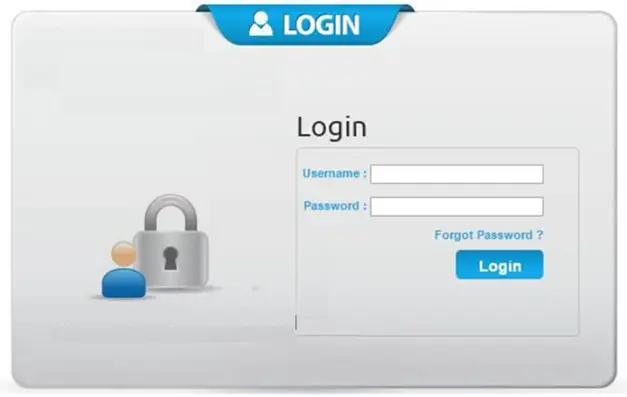
          1. Log in to Synapse.

          image - Sukam Apps Services

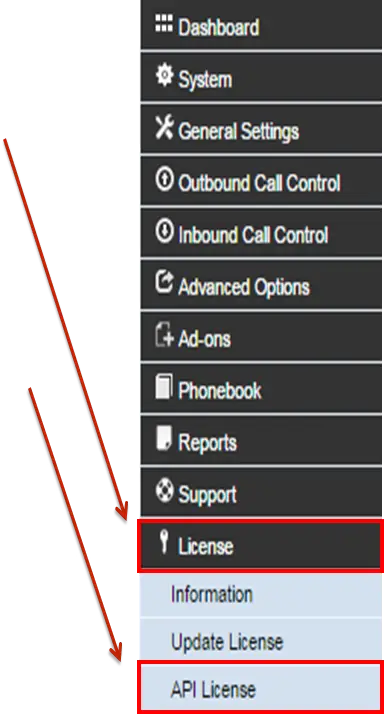
          2. Go to the License menu.

          image - Sukam Apps Services

          3. Click on API License.

          image - Sukam Apps Services

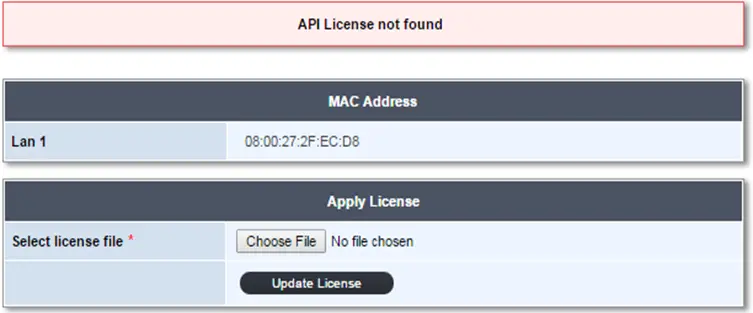
          4. Choose the License File and click “Update License” to activate the API License.

          image - Sukam Apps Services

          Configuring Synapse API

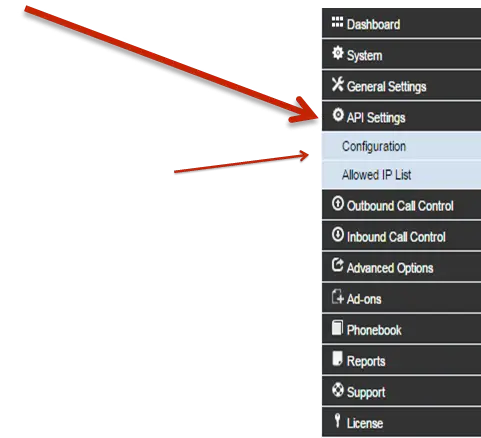
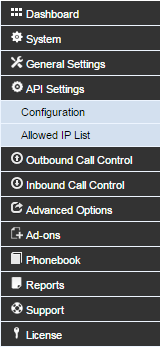
          1. After activation of the API License, a new item “API Settings” will appear in the menu.


          Click on Configuration

          image - Sukam Apps Services

          Configuring Synapse API

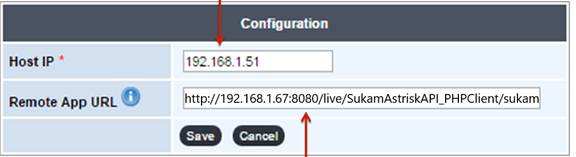
          1. Enter Sukam Synapse or Static IP Address.
          2. Enter the Remote APP URL for receiving call logs.


          Click on Configuration

          image - Sukam Apps Services

          Click on Allowed IP List

          Click on Allowed IP List - Sukam Apps Services

          Configure Synapse API

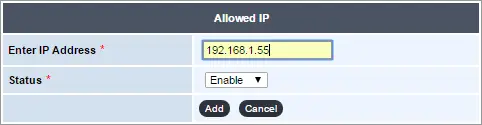
          Here Add System IPs to allow “Click to Call” from that system in the “Allowed IP List” section.

          Configure Synapse API - Sukam Apps Services
          Allowed IP List - Sukam Apps Services

          Giving Call Commands to Synapse

          Call commands (originate, transfer, hang-up) are sent to Sukam Synapse using specific HTTP URLs that include the action details in a JSON format.

          A. Originate Call (Place New Call)

          • Action: Originate

          • Example JSON Parameter:

            JSON

             
            {
              "action": "Originate",
              "extension": "70",
              "number": "9876543XXX",
              "context": "DLPN_all"
            }
            
          • Example Full URL Request:

            http://192.168.1.51/SukamAsteriskAPI/synapseactions.php?actiondetails={“action”:”Originate”,”extension”:”SIP/70″,”number”:”9876543XXX”,”context”:”DLPN_all”}

          FieldDescriptionExample Value
          192.168.1.51Synapse IP Address192.168.1.51
          extensionThe extension placing the call70 
          numberThe number to be called9876543XXX
          contextThe dial plan for the extensionDLPN_all

           B. Transfer Call

          • Action: Transfer call

          • Example JSON Parameter:


            JSON


            {
              "action": "Transfer",
              "transferchannel": "DAHDI/21",
              "newextension": "46",
              "context": "DLPN_all"
            }


          • Example Full URL Request:

            http://192.168.1.51/SukamAsteriskAPI/synapseactions.php?actiondetails={“action”:”Transfer”,”transferchannel”:”DAHDI/21″,”newextension”:”46″,”context”:”DLPN_all”}

          FieldDescriptionExample Value
          transferchannelThe channel to be transferredDAHDI/21
          newextensionThe new extension/number to transfer to46

          C. Hang-up Call

          • Action: Hangup

          • Example JSON Parameter:


            JSON


            {
              "action": "Hangup",
              "hangupchannel": "SIP/700000418d"
            }


          • Example Full URL Request:

            http://192.168.1.51/SukamAsteriskAPI/synapseactions.php?actiondetails={“action”:”Hangup”,”hangupchannel”:”SIP/700000418d”}

          FieldDescriptionExample Value
          hangupchannelThe channel to be terminatedSIP/700000418d

          3. Getting Call Events from Synapse

          Synapse sends call events (start, connect, finish) to the Remote APP URL configured in the API Settings. The Synapse server will execute your application URL with a JSON string of the call status via the GET method.

          A. Call Start Event

          Sent when a call is initiated.

          • Key Action Items: Use the hangupchannel value for later call hang-up, and the redirectchannel for call transfer.

          • Example JSON:

            JSON

            {
              "asteriskhost": "192.168.1.51",
              "event": "CallStart",
              "direction": "Outgoing",
              "number": "9876543XXX",
              "extension": "70",
              "hangupchannel": "SIP\/700000418d",
              "redirectchannel": "DAHDI\/21",
              "uniqueid": "1430819361.25418"
            }
            

          B. Call Connect Event

          Provides details when the call is answered/connected.

          C. Call Finish Event (Call Details Records – CDR)

          Sent when a call ends, providing a complete summary.

          • Example JSON:

            JSON

            {“asteriskhost”:”192.168.1.51″,”event”:”CallFinish”,”direction”:”Outgoing”,”number”:”9876543XXX”,”extension”:”70″,”starttime”:”2015050515:19:21″,”answertime”:”2015050515:19:29″,”endtime”:”2015050515:19:36″,”duration”:”15″,”billableseconds”:”7″,”disposition”:”Answered”,”uniqueid”:”1430819361.25418″,”recordlink”:”http:\/\/192.168.1.51\/callrecord\/2015\/May\/05052015\/050520151430819361.25418639033917453.wav”}


          Retrieving Call Details Records (CDR)

          You can explicitly fetch CDRs extension-wise between two dates by executing a separate URL:

          • URL Format:

            http://serverip/SukamAsteriskAPI/asteriskapi/cdr.php?action=getcdr&extension=extensionno&fromdate=fromdate&todate=todate

          • Example Request:

            http://192.168.1.51/SukamAsteriskAPI/asteriskapi/cdr.php?action=getcdr&extension=70&fromdate=2015-11-06&todate=2015-11-07


          Synapse will return a JSON string containing all call details records within the specified dates.