In India, business owners and salespeople often collect visiting cards during meetings, exhibitions and business events.
But what happens after collecting those cards? Some stay in a drawer, some get lost, and others are never followed up.
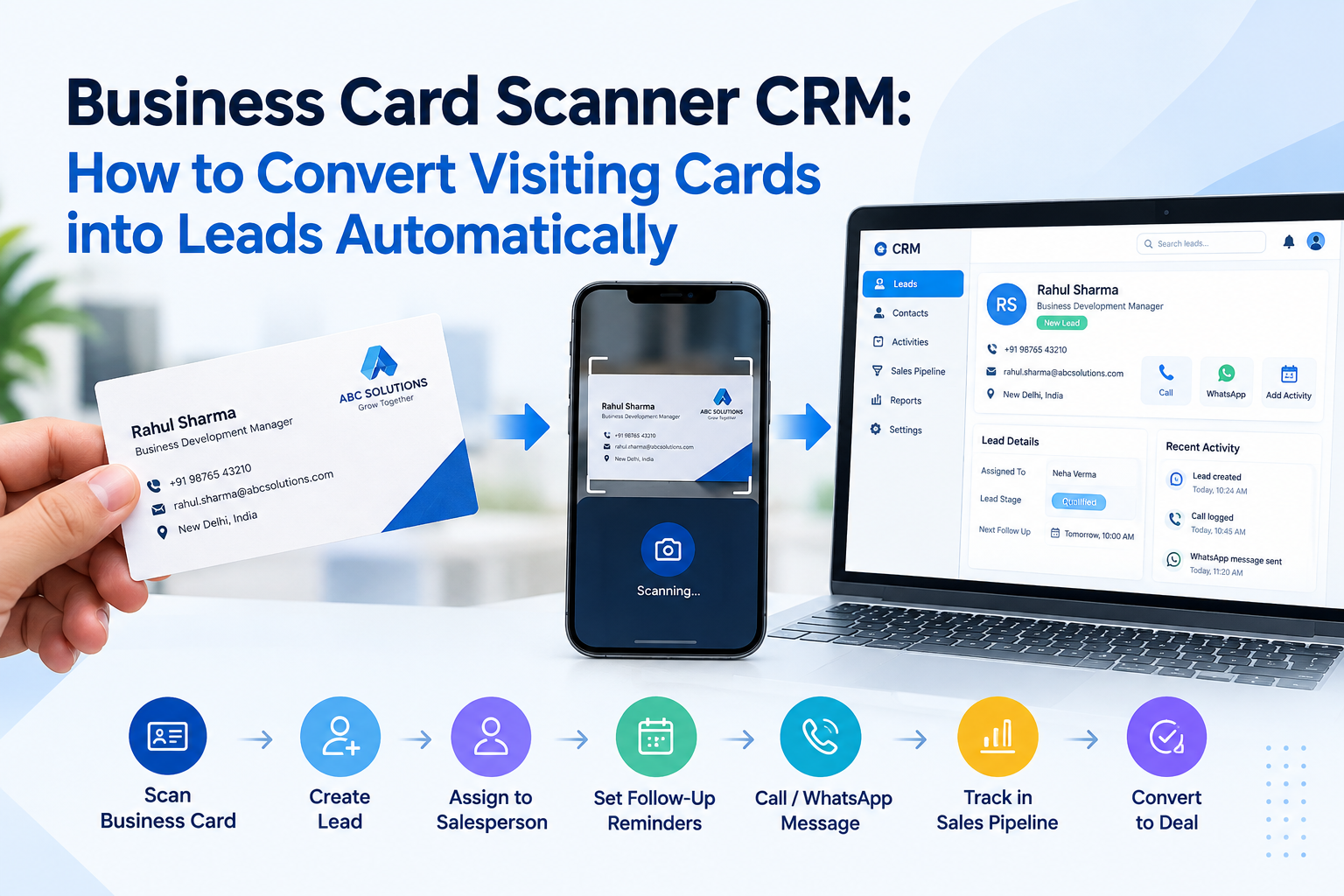
A business card scanner connected to a CRM can help turn these contacts into organised lead records.
1. Stop Entering Every Contact Manually
Suppose your salesperson attends an industrial exhibition and collects 40 visiting cards.
Entering every person’s name, company, phone number and email address manually takes time.
With a compatible business card scanning feature, the salesperson can scan each card and convert its details into a digital contact or lead record.
The exact fields captured depend on the scanning technology and the quality of the card.
2. Keep Your Leads Organised
After scanning a card, your team can review the details and save the contact in the CRM.
Depending on the CRM’s features, you may also be able to assign the lead to a salesperson, add notes about the meeting and schedule a follow-up.
This makes it easier to find contacts later instead of searching through a pile of visiting cards.
3. Don’t Forget the Follow-Up
Imagine your salesperson meets a potential dealer at an exhibition. The dealer asks for a product catalogue and quotation.
Scanning the visiting card is only the first step. Your salesperson should also record the customer’s requirement and decide when to follow up.
Otherwise, the digital contact may simply sit in the CRM without any further action.
4. Check These Things Before Using a Card Scanner
- Can it capture the details you need?
- Can you review and correct scanning mistakes?
- Can the scanned contact be saved as a lead in the CRM?
- Can your team assign the lead and schedule follow-ups?
Always verify which features are supported by your chosen CRM.
Where Visiting Cards Pile Up
Visiting cards usually arrive in bunches: after a trade fair, an exhibition, a dealer meet or a week of field visits. The salesperson comes back with a pocket full of cards and every intention of following up.
Then daily work takes over. Some cards are entered into Excel, some stay in a drawer, and some are lost. By the time someone calls, the buyer has already spoken to two other suppliers.
A business card scanner in the CRM shortens this gap. The card is scanned on the mobile, the details become a lead, and a follow-up can be set the same day.
What to Do Right After Scanning
- Check the scanned details, especially the mobile number and email, because printed cards are not always read perfectly.
- Select the lead source, for example the name of the exhibition, so you can later see which event brought the best leads.
- Add a short note about what the person was interested in.
- Set the next follow-up date before you move to the next card.
These four steps take less than a minute per card, and they turn a pile of paper into leads your team can work on.
After the Exhibition: Follow Up While the Lead Is Warm
The days right after an exhibition are the most important. Buyers still remember your stall and your products. A quick message thanking them for visiting, followed by a call, makes a strong impression.
With the leads already in the CRM, the owner can check how many cards were collected, how many were called and how many asked for a quotation. Read more about keeping every enquiry moving in our guide on tracking the work done on each lead.
Final Advice
A business card is not just a piece of paper. It can be the beginning of a new business relationship.
Scan the card, check the details, record the customer’s requirement and plan the next follow-up. That is how you turn collected contacts into leads your team can actually manage.
Want to organise leads collected at exhibitions and business meetings? Discuss your requirements with the Sukam Apps team.