Introduction
A visiting card can be the beginning of a valuable business relationship.
But collecting a card is only the first step.
The real challenge is entering its information, assigning the lead and following up quickly.
A Business Card Scanner CRM helps solve this problem.
It scans a visiting card and converts the information into a digital lead record.
Instead of manually typing names, phone numbers, emails and company details, your team can capture them automatically.
This saves time, reduces manual data entry, and helps sales teams follow up faster.
For businesses attending exhibitions, trade shows, networking events and client meetings, automated business card scanning can make lead management much easier.
What Is a Business Card Scanner?
A Business Card Scanner is a tool that captures information from a physical visiting card and converts it into digital contact information.
It can identify details such as:
- Name
- Mobile number
- Email address
- Company name
- Designation
- Website
- Business address
The captured information can then be saved as a contact or lead inside a CRM system.
What Is a Business Card Scanner in CRM?
A Business Card Scanner in CRM connects physical networking with digital lead management.
Instead of keeping hundreds of visiting cards, your team can scan them and create organized CRM records.
This means your sales team can move from:
Visiting Card → Digital Contact → CRM Lead → Follow-Up → Sales Opportunity
The entire process becomes easier to track.
Why Do Businesses Need a Visiting Card Scanner?
Business owners and sales teams collect visiting cards everywhere.
They collect them at:
- Trade exhibitions
- Business conferences
- Networking events
- BNI meetings
- Industry expos
- Seminars
- Client meetings
- Dealer meetings
- Real estate events
- Manufacturing exhibitions
The problem starts after the event.
You may have 50, 100, or even hundreds of cards.
Someone then has to enter all that information manually.
This creates several problems.
Common Problems with Manual Business Card Data Entry
1. Manual Data Entry Takes Time
Employees need to type every name, phone number, email, and company name.
When hundreds of cards are collected, this becomes a major administrative task.
Your sales team could spend that time talking to prospects instead.
2. Visiting Cards Can Get Lost
Physical cards are easy to misplace.
A card may remain inside a drawer for weeks.
By the time someone finds it, the opportunity may already be cold.
3. Follow-Ups Get Delayed
A prospect who gives you their card expects some form of communication.
If your team waits several days before making contact, the prospect may move to another supplier.
Fast follow-up gives your business a better chance to continue the conversation.
4. Data Entry Errors Can Affect Sales
Manual typing can lead to:
- Incorrect phone numbers
- Spelling mistakes
- Wrong email addresses
- Missing company names
- Duplicate contacts
Even a small mistake can make a lead difficult to contact.
5. Leads Remain Outside Your Sales Process
A visiting card sitting inside a drawer is not a managed lead.
Your sales team needs to know:
- Who is the prospect?
- Which company are they from?
- Who should contact them?
- When should they be contacted?
- What was discussed?
- What is the next step?
This is where CRM-based lead management becomes important.
How Does a Business Card Scanner Work?
A modern business card scanner app uses OCR technology to read information from a card.
What Is OCR?
OCR stands for Optical Character Recognition.
It is a technology that recognizes text from an image.
For example, when you take a photo of a visiting card, OCR can identify the name, phone number, email address and company information.
The information can then be transferred into your CRM.
The Process-
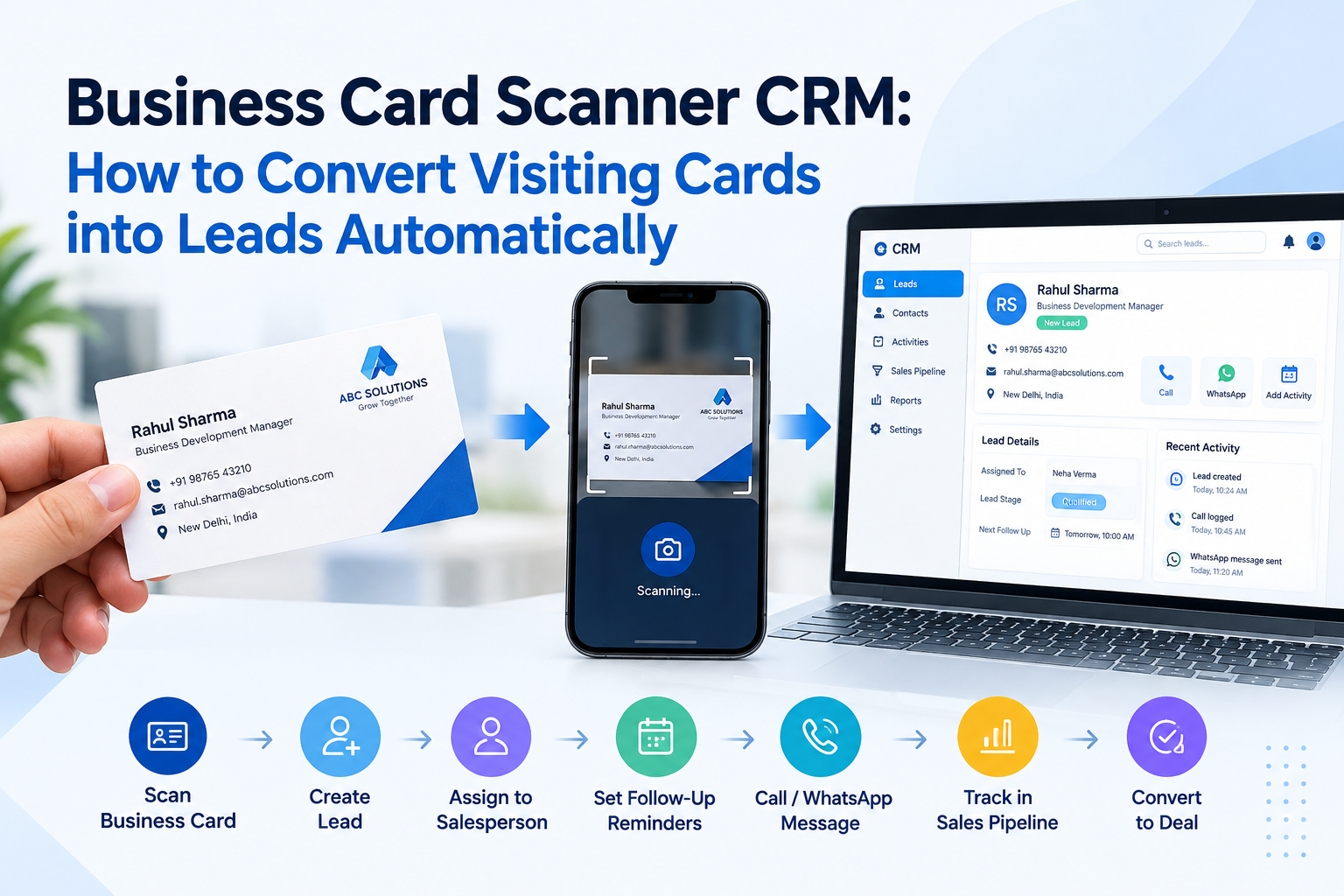
Step 1: Scan the Card
Take a picture of the visiting card using the scanner.
Step 2: Read the Information
The system identifies the text printed on the card.
Step 3: Capture Contact Details
Important fields such as name, phone number, email, and company are identified.
Step 4: Create the Lead
The information can be saved as a CRM contact or lead.
Step 5: Start Follow-Up
Your sales team can then call, message, email, or schedule a follow-up.
This turns a physical visiting card into an actionable business opportunity.
How to Scan Visiting Cards into CRM
The process can be much simpler than traditional data entry.
Traditional Process:
Collect Card → Keep Card → Enter Data Later → Find Card → Create Lead → Follow Up
This process involves several manual steps.
Automated Process:
Scan Card → Capture Information → Create Lead → Assign Follow-Up
The second process reduces unnecessary administrative work.
Your sales team can focus more on selling and less on entering information.
How a Business Card Scanner Helps with Lead Management
Scanning a visiting card is only useful when the information becomes part of your sales process.
A CRM helps take the next steps.
After a lead is captured, businesses can:
- Assign the lead to a salesperson
- Schedule follow-up activities
- Track calls
- Record conversations
- Send WhatsApp messages
- Track sales stages
- Add notes
- Set reminders
- Monitor lead status
- Track conversion
- Generate sales reports
This creates a complete lead management system.
Business Card Scanner and Sales Automation
A business card scanner can become the first step in a larger sales automation workflow.
For example:
Business Card Scanned
↓
Lead Created
↓
Salesperson Assigned
↓
Follow-Up Reminder Created
↓
Call or WhatsApp Message
↓
Opportunity Created
↓
Sales Pipeline Updated
↓
Deal Converted
The important point is simple.
The scanner captures the information.
The CRM helps your team manage what happens next.
Benefits of Using a Business Card Scanner CRM
1. Save Time on Data Entry
Your employees spend less time typing contact information manually.
This is particularly useful after exhibitions and networking events.
2. Capture Leads Faster
A prospect can be added to your digital lead database soon after meeting them.
This helps your team respond while the conversation is still fresh.
3. Improve Follow-Up Management
Once the lead is inside the CRM, your team can create reminders and activities.
This reduces the chance of forgetting important prospects.
4. Reduce Manual Work
Salespeople should spend more time speaking with customers.
They should not spend hours copying information from visiting cards into spreadsheets.
5. Keep Customer Information Organized
Instead of keeping physical cards in different places, your business can maintain digital records.
Your team can access customer information from one system.
6. Reduce Duplicate Data
A centralized CRM can help businesses identify duplicate records.
This is especially important when multiple employees collect leads from the same event.
7. Improve Sales Visibility
Managers can see how many leads were captured.
They can also monitor:
- Lead status
- Assigned salesperson
- Follow-up activities
- Sales opportunities
- Conversions
- Team performance
Business Card Scanner vs Manual Data Entry
| Feature | Manual Data Entry | Business Card Scanner CRM |
|---|---|---|
| Contact Capture | Manual | Automated |
| Data Entry | Time-consuming | Faster |
| Human Typing | Required | Reduced |
| Lead Creation | Manual | Simplified |
| Follow-Up | Often delayed | Can start quickly |
| Lead Tracking | Difficult | Centralized |
| Duplicate Management | Difficult | Easier |
| Sales Reporting | Limited | Better visibility |
| Team Productivity | Lower | Higher |
| Scalability | Difficult with many cards | Easier to manage |
Business Card Scanner for Sales Teams
Sales teams are among the biggest users of visiting cards.
A salesperson may meet dozens of prospects during a single event.
Without a proper system, those contacts may remain unused.
A business card scanner for sales teams helps convert those physical contacts into organized digital leads.
Sales managers can then track whether each lead was contacted.
They can also see which prospects moved forward in the sales pipeline.
Business Card Scanner for Small Businesses
Small businesses often operate with limited staff.
One employee may handle sales, customer communication, and administrative work.
Manual data entry creates unnecessary pressure.
A business card scanner for small businesses can reduce repetitive work.
The same approach can support growing SMEs that collect large numbers of leads from events and networking activities.
Industry Examples
Real Estate-
Property dealers and real estate companies collect contacts from property exhibitions, site visits, referrals, and networking events.
A visiting card scanner can help convert these contacts into organized property leads.
For a property dealer in Chandigarh, Mohali, Ludhiana, or Delhi, faster lead capture can make follow-up easier.
Manufacturing-
Manufacturers often meet:
- Dealers
- Distributors
- Suppliers
- Buyers
- Importers
- Exporters
at industrial exhibitions.
A manufacturer can scan each visiting card and add the contact to the CRM.
This is especially useful for businesses in Jalandhar, Ludhiana, Chandigarh and other manufacturing hubs.
Immigration Consultants-
Immigration businesses receive enquiries from students, families, professionals and referral partners.
A business card scanner can help capture partner and prospect information quickly.
The team can then organize follow-ups through the CRM.
Education-
Educational institutes collect contacts during:
- Education fairs
- Seminars
- Career events
- Counselling sessions
Scanning these cards can help staff organize enquiries and follow-ups.
Healthcare-
Hospitals, clinics, medical suppliers and healthcare businesses can use digital contact capture for referrals, business partners, and professional networking.
Hotels and Hospitality-
Hotels meet corporate clients, event organizers, travel partners and business customers.
A digital lead capture process can make relationship management easier.
Travel Agencies-
Travel companies can capture contacts from exhibitions, corporate meetings, tourism events and referral partners.
These contacts can then enter a structured follow-up process.
Business Card Scanner for Exhibition Leads
Exhibitions can generate hundreds of potential customers.
But collecting leads is not enough.
The real value comes from what happens after the exhibition.
Consider a manufacturing company attending an industrial exhibition.
The sales team collects 200 visiting cards.
With manual processes, the team may need several hours to enter the information.
With a business card scanner, those contacts can be captured much faster.
The team can then focus on qualification and follow-up.
This makes business card lead capture an important part of exhibition lead management.
From Visiting Card to Sales Opportunity
A visiting card should not remain just a contact.
It can become a sales opportunity.
For example:
Visiting Card
↓
Digital Contact
↓
CRM Lead
↓
Lead Qualification
↓
Follow-Up
↓
Opportunity
↓
Sales Pipeline
↓
Customer
This is the real value of connecting a business card scanner with CRM software.
Why CRM Is Better Than Storing Visiting Cards in Excel
Excel can be useful for simple lists.
But sales teams often need much more than a list of names and phone numbers.
A CRM can connect customer information with:
- Follow-up activities
- Calls
- WhatsApp conversations
- Sales stages
- Tasks
- Opportunities
- Reports
- Team assignments
This makes CRM software more suitable for structured lead management.
How Sukam Apps CRM Supports Lead Management
Sukam Apps Services helps Indian businesses manage leads, sales activities, customer support and business processes through practical automation.
Sukam Apps CRM provides capabilities for:
- Lead management
- Opportunity tracking
- Sales tracking
- Follow-up management
- Workflow automation
- Customer support
- WhatsApp integration
- Cloud telephony integration
- AI call summaries
- AI follow-up suggestions
- Sales insights
- Team performance analysis
- Reports and dashboards
- Mobile CRM access
The goal is not to add more work for your team.
The goal is to reduce repetitive work and make the sales process easier to manage.
Business Card Scanning Is Only the Beginning
A scanner solves the first problem: capturing contact information.
But businesses also need to manage what happens afterward.
A complete sales process should answer:
Who is the lead?
Who should contact them?
When should they be contacted?
What did the salesperson discuss?
What is the next action?
Did the lead become an opportunity?
Did the opportunity become a customer?
A connected CRM helps answer these questions.
Who Should Use Business Card Scanner Software?
Business card scanning software can be useful for:
- Small businesses
- Medium-sized businesses
- Sales teams
- Manufacturers
- Real estate companies
- Immigration consultants
- Educational institutes
- Healthcare businesses
- Hotels
- Travel agencies
- Retail businesses
- Financial service companies
- Logistics companies
- Professional service firms
- Distributors
- Dealers
If your business regularly collects visiting cards, automated lead capture can be worth considering.
These keywords should be used naturally across headings, paragraphs, FAQs, image alt text, and supporting content.
Avoid repeating the same keyword unnaturally.
Frequently Asked Questions
What is a Business Card Scanner CRM?
A Business Card Scanner CRM captures information from visiting cards and helps convert it into organized CRM contacts or leads.
How does a visiting card scanner work?
It uses OCR technology to read information from a card image and identify details such as names, phone numbers, emails, and company names.
Can I scan a business card directly into CRM?
Yes. A CRM with business card scanning capabilities can simplify the process of converting physical cards into digital lead records.
What is OCR in business card scanning?
OCR means Optical Character Recognition. It allows software to recognize printed text from an image.
Can a business card scanner reduce manual data entry?
Yes. It reduces the need to manually type contact information from every visiting card.
Is a business card scanner useful for sales teams?
Yes. Sales teams can capture contacts faster and move them into their follow-up process.
Can business card scanning help with exhibition leads?
Yes. It can help sales teams organize contacts collected during exhibitions, trade shows, conferences, and networking events.
Is a business card scanner useful for SMEs?
Yes. SMEs can use automated lead capture to reduce repetitive administrative work and improve follow-up management.
What is the difference between a business card scanner and a business card reader?
Both terms are often used for similar tools. A scanner usually refers to capturing the card image, while a reader focuses on extracting information from it.
Can scanned contacts be used for sales follow-ups?
Yes. When connected to a CRM, captured contacts can become part of the sales follow-up process.
Conclusion
A visiting card represents a potential business relationship.
But collecting the card is not enough.
The information needs to reach your sales process quickly.
A Business Card Scanner CRM helps businesses convert physical visiting cards into organized digital leads.
It can reduce manual data entry, improve lead capture, simplify follow-ups, and give sales managers better visibility.
For manufacturers, real estate companies, immigration consultants, educational institutes, healthcare businesses, hotels, travel agencies and other SMEs, this can remove an unnecessary administrative step.
The bigger opportunity is not simply scanning a card.
It is creating a connected process from lead capture to customer conversion.
How Sukam Apps Services Can Help
Sukam Apps Services focuses on practical business automation for Indian SMEs.
Our solutions cover CRM, sales automation, customer support, cloud telephony, WhatsApp Business API, AI-powered call analysis, workflow automation and other business processes.
The objective is simple:
Help your team spend less time on repetitive work and more time with customers.
If your business is still managing visiting cards, Excel sheets and manual follow-ups, it may be time to simplify the process.
Explore how practical automation can improve your lead management and sales workflow with Sukam Apps Services.
Related Articles
If you want to improve your lead management, sales follow-ups, and business automation, these related topics may also help:
- Stop Losing Sales: Your Ultimate Follow-Up Secret Now!
- How to Manage Leads from Facebook, Instagram, WhatsApp, Calls and Website in One Place
- How to Coach Every Sales Call with AI Without Micro-Managing Your Team
- HHow AI Can Save 30 Minutes After Every Customer Call
- How to Track Referral Leads and Never Lose High-Value Customers
- How to Improve Sales Follow-Up and Stop Losing Leads After the First Call
- How to Track Employee Calls and Monitor Sales Team Performance Remotely
- How to Measure Marketing ROI and Stop Wasting Your Advertising Budget