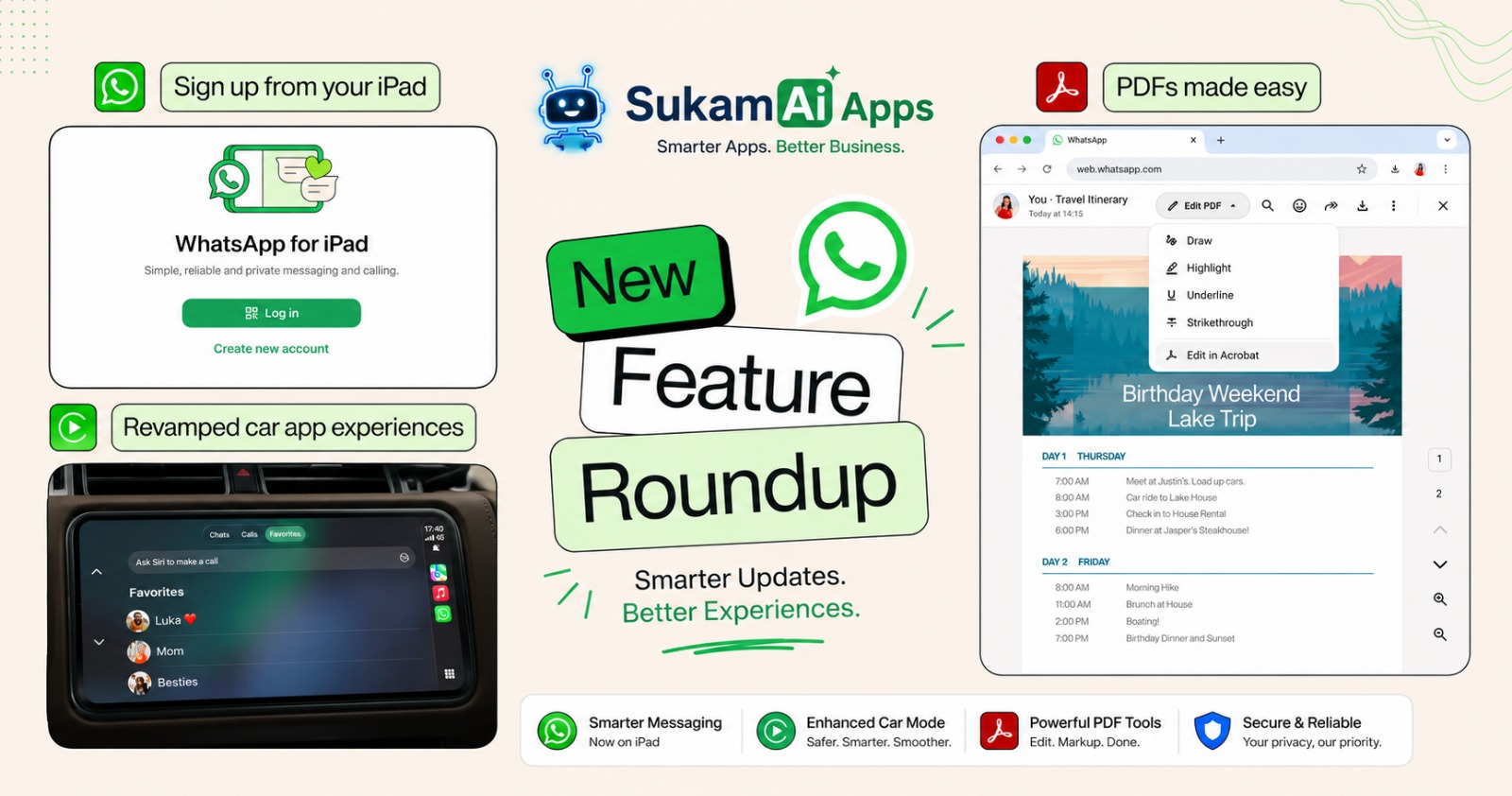
WhatsApp is becoming more useful across phones, tablets, computers, and cars. The latest WhatsApp features make messaging, calling, document sharing, and daily communication easier.
For businesses, this matters because customers expect quick responses. Teams also need simple ways to communicate without depending on one device.
WhatsApp’s latest updates include direct iPad registration, improved CarPlay and Android Auto, PDF editing, and music sharing.
Why Are the Latest WhatsApp Features Important for Businesses?
Many Indian businesses already use WhatsApp for customer communication.
A property dealer may receive enquiries on WhatsApp. An immigration consultant may share documents with clients. A manufacturer may receive quotation requests through WhatsApp.
The problem starts when conversations become difficult to manage.
Common challenges include:
- Customer messages getting missed.
- Sales teams taking too long to respond.
- Important documents being difficult to review.
- Employees depending on personal phones.
- Customer conversations staying scattered across devices.
- Follow-ups being handled manually.
- Managers having limited visibility into customer communication.
These problems can affect sales and customer service.
The latest WhatsApp updates make everyday communication more flexible. Businesses can also connect WhatsApp with automation tools for larger communication workflows.
What Are the Latest WhatsApp Features?
The latest WhatsApp updates include several features that improve how people communicate across devices.
The most useful updates include:
- WhatsApp registration directly on iPad.
- Improved WhatsApp experience with CarPlay and Android Auto.
- PDF editing inside WhatsApp Web and Desktop.
- Music sharing through WhatsApp Status.
- New business communication and automation capabilities.
Let’s understand what these changes mean for businesses.
1. WhatsApp Can Now Be Registered Directly on iPad
WhatsApp can now be registered directly through the iPad app.
Users no longer need to link the iPad to an existing phone account to create an account.
Why Does WhatsApp on iPad Matter for Businesses?
An iPad can be useful for sales teams, consultants, reception staff, and business owners.
A larger screen can make customer conversations easier to manage.
For example, an immigration consultant in Chandigarh can handle client messages while reviewing documents on the same device.
A sales manager in Ludhiana can also use the iPad while working away from the office.
Business benefits include:
- Easier customer communication.
- Better multitasking.
- Larger conversation view.
- More flexible device usage.
- Less dependence on one smartphone.
For teams working across Chandigarh, Mohali, Ludhiana, and Jalandhar, device flexibility can improve daily productivity.
2. WhatsApp Gets Better with Apple CarPlay and Android Auto
WhatsApp has also upgraded its car experience.
Users can now hear and respond to messages, make calls, view call history, and access favourite contacts through CarPlay and Android Auto.
Why Does This Matter?
Business owners and sales professionals often travel between cities.
A sales representative may travel from Chandigarh to Ludhiana. Another employee may travel between Ambala, Jalandhar, and Amritsar.
Hands-free communication can make these journeys more convenient.
However, drivers should always prioritize road safety and follow local driving laws.
Useful capabilities include:
- Listening to WhatsApp messages.
- Responding through voice.
- Making WhatsApp calls.
- Checking recent calls.
- Accessing favourite contacts.
The goal is simple: reduce the need to handle your phone while driving.
3. Edit PDFs Directly in WhatsApp Web and Desktop
Businesses send PDFs every day.
These may include:
- Quotations.
- Invoices.
- Agreements.
- Contracts.
- Brochures.
- Application documents.
- Product information.
- Business proposals.
WhatsApp now allows users to open PDFs directly without downloading them first.
Users can also make lightweight edits, such as highlighting and annotations. The feature is available on WhatsApp Web and Desktop and is powered by Adobe Acrobat.
How Can This Help Businesses?
Imagine a customer sends a quotation to a sales manager.
The manager can open the PDF, highlight important information, and add annotations.
This reduces unnecessary file handling.
It can also make document-based conversations easier for teams in manufacturing, real estate, education, and professional services.
4. Share Music Directly to WhatsApp Status
WhatsApp is also adding more ways to personalize Status updates.
Users can share songs from Apple Music or Spotify directly to their WhatsApp Status.
This is mainly a personal communication feature.
However, businesses can also use Status as part of their communication strategy.
For example, a hotel could share music with a travel-themed Status. A retail business could use Status to create more engaging updates.
WhatsApp also introduced additional Status features, including music, photo stickers, layouts, and interactive stickers.
What Do These WhatsApp Updates Mean for Businesses?
These updates solve everyday communication problems.
But businesses should look beyond individual WhatsApp features.
The bigger question is:
How can WhatsApp become part of a complete customer communication process?
This is where business automation becomes important.
A business may receive hundreds of WhatsApp messages every month.
Managing every conversation manually can become difficult.
A structured communication system can help teams manage enquiries, follow-ups, support requests, and customer information more efficiently.
WhatsApp Business vs WhatsApp Business API
Businesses often confuse WhatsApp Business with the WhatsApp Business API.
They serve different needs.
| Feature | WhatsApp Business App | WhatsApp Business API |
|---|---|---|
| Best for | Small teams | Growing businesses |
| Multiple users | Limited | Designed for team workflows |
| Automation | Basic | Advanced |
| Customer notifications | Limited | Supported through approved templates |
| CRM integration | Limited | Possible |
| Chatbots | Limited | Advanced integrations possible |
| Team management | Basic | More scalable |
| Customer support workflows | Basic | More structured |
| Reporting | Limited | Can connect with business systems |
WhatsApp Business API allows businesses to connect WhatsApp with software, automation, customer support tools, and other business systems.
For example, a company can connect WhatsApp with its CRM.
A new enquiry can then enter the sales workflow instead of remaining only inside a chat.
The Problem With Managing Business WhatsApp Manually
WhatsApp is convenient.
But convenience can become a problem when customer conversations increase.
Consider a real estate company in Mohali.
Its sales team receives enquiries from property buyers throughout the day.
Without a structured process, employees may need to:
- Check multiple conversations.
- Remember follow-up dates.
- Copy customer information manually.
- Search old messages.
- Share updates with managers.
- Track leads in separate spreadsheets.
This creates extra work.
It can also increase the chance of missed follow-ups.
Manual follow-up se deal miss ho sakti hai.
How WhatsApp Automation Can Improve Customer Communication
WhatsApp automation connects customer communication with business processes.
For example:
Customer enquiry → Lead captured → WhatsApp response → Follow-up → Sales activity → Customer support
Instead of keeping information only inside WhatsApp, businesses can connect conversations with their wider workflow.
Businesses can use automation for:
- Lead notifications.
- Customer enquiries.
- Appointment reminders.
- Follow-up messages.
- Order updates.
- Customer support.
- Payment reminders.
- Service notifications.
- Internal alerts.
- Feedback collection.
The exact workflow depends on the business.
A manufacturer will need different automation from an immigration consultant.
How Can a CRM and WhatsApp Work Together?
A CRM is software that helps businesses manage customer information and sales activities.
When WhatsApp connects with a CRM, customer communication becomes easier to track.
For example:
WhatsApp enquiry → Lead created → Salesperson assigned → Follow-up scheduled → Conversation tracked → Deal updated
This creates a more organized customer journey.
Sukam Apps CRM can help businesses manage leads, opportunities, sales activities, customer support, follow-ups, WhatsApp integration, cloud telephony, reports, and dashboards from one platform.
The objective is not to add another tool.
The objective is to reduce manual work.
How Sukam Apps Services Helps Businesses
Sukam Apps Services is an Indian business automation company focused on helping SMEs simplify sales, customer service, and daily operations.
Its approach starts with understanding the business process.
The goal is to identify where employees spend unnecessary time.
Then, practical technology and automation can be used to improve that process.
Sukam Apps Services provides solutions including:
- AI-Powered CRM.
- Cloud IVR.
- Call Center Solutions.
- AI Call Analysis and Speech Analytics.
- WhatsApp Business API.
- Sales and Customer Support Automation.
- Tally on Cloud.
- Office Process Automation.
- Custom Software Development.
- API Integrations.
- Mobile CRM Applications.
The philosophy is simple:
Making technology simple, effective, and accessible for every business.
How Sukam Apps CRM Can Support WhatsApp Communication
Sukam Apps CRM is designed for Indian businesses managing sales and customer relationships.
It can help teams manage:
- Lead Management.
- Opportunity Tracking.
- Sales Tracking.
- Follow-ups.
- Customer Support.
- Workflow Automation.
- WhatsApp Integration.
- Cloud Telephony Integration.
- Mobile CRM.
- Reports and Dashboards.
- AI Call Summaries.
- AI Follow-up Suggestions.
- AI Sales Insights.
- Team Performance Analysis.
This can help businesses create a more connected customer journey.
Instead of asking employees to remember every conversation, the system can help organize important customer activities.
AI Can Take WhatsApp Automation Further
AI can help businesses analyze customer conversations and identify useful information.
For example, AI can help identify:
- Customer requirements.
- Sales opportunities.
- Common objections.
- Important follow-ups.
- Customer sentiment.
- Employee performance.
- Suggested next actions.
The purpose is not to replace your sales or support team.
The purpose is to remove repetitive work.
Your team can then spend more time talking to customers.
WhatsApp Communication Examples by Industry
Different businesses can use WhatsApp in different ways.
| Industry | Common WhatsApp Use |
|---|---|
| Real Estate | Property enquiries and follow-ups |
| Immigration | Client updates and document communication |
| Manufacturing | Dealer enquiries and quotation communication |
| Education | Student enquiries and admission updates |
| Healthcare | Appointment communication |
| Hotels | Booking and guest communication |
| Travel | Trip updates and customer support |
| Retail | Product enquiries and order updates |
| Finance | Customer communication and reminders |
| Logistics | Delivery and shipment updates |
| Construction | Customer and project communication |
| Professional Services | Client updates and follow-ups |
Local Business Example: A Property Dealer in Chandigarh
Consider a property dealer managing enquiries across Chandigarh, Mohali, and Panchkula.
A potential buyer sends a WhatsApp message about a property.
The salesperson replies manually.
The customer then asks for the price, location, brochure, and site visit.
If the salesperson does not record the enquiry properly, follow-up can be missed.
With WhatsApp and CRM integration, the business can create a structured process.
Enquiry → Lead → Property requirement → Follow-up → Site visit → Sales opportunity
This gives the salesperson a clear next action.
The manager can also get better visibility into the sales pipeline.
Old Way vs New Way of Managing WhatsApp Communication
| Old Way | New Way |
|---|---|
| Messages managed manually | Structured communication workflow |
| Customer data copied into spreadsheets | Customer information stored centrally |
| Follow-ups remembered manually | Follow-ups scheduled |
| Conversations difficult to track | Customer history easier to access |
| Limited management visibility | Reports and dashboards |
| Repetitive replies | Automated responses where suitable |
| Manual customer updates | Automated notifications |
| Separate business tools | Connected business systems |
The right approach depends on the company’s size and workflow.
Automation should simplify work, not make it more complicated.
WhatsApp Features Businesses Should Watch
WhatsApp continues to expand its communication and business capabilities.
Recent updates also include improvements around business campaigns, AI support, and calling options for businesses.
WhatsApp has also introduced features for managing multiple accounts and transferring chat history across platforms.
This shows an important trend.
WhatsApp is moving beyond simple messaging.
It is becoming a larger communication channel for both consumers and businesses.
Businesses should therefore think about how WhatsApp fits into their complete customer journey.
Frequently Asked Questions About WhatsApp Features
What are the latest WhatsApp features?
The latest WhatsApp updates include direct iPad registration, improved CarPlay and Android Auto, PDF editing, and music sharing.
Can I use WhatsApp directly on an iPad?
Yes. WhatsApp now allows users to register directly through the iPad app without linking the account to a phone.
Can WhatsApp PDFs be edited without downloading them?
Yes. WhatsApp Web and Desktop allow users to open PDFs and make lightweight edits such as highlighting and annotations.
Can WhatsApp work with Apple CarPlay?
Yes. WhatsApp has introduced an improved CarPlay experience for messages, calls, call history, and favourite contacts.
What is WhatsApp Business API?
WhatsApp Business API allows businesses to connect WhatsApp with software and business workflows.
It is useful for customer communication, notifications, automation and integrations.
Can WhatsApp be connected to a CRM?
Yes. Businesses can connect WhatsApp with compatible CRM platforms and automation systems.
This can help manage leads, conversations, follow-ups, and customer support.
Is WhatsApp automation useful for small businesses?
Yes, when used for the right tasks.
Small businesses can automate repetitive communication while keeping important customer conversations personal.
How can businesses automate WhatsApp customer support?
Businesses can connect WhatsApp with automation tools, CRM software, chatbots, and approved messaging workflows.
The right setup depends on the business process and customer journey.
Conclusion: WhatsApp Is Becoming More Useful for Business Communication
The latest WhatsApp features make communication easier across devices.
The bigger opportunity is connecting WhatsApp with your business processes.
A business should not only ask, “How can we use WhatsApp?”
It should ask:
“How can we use WhatsApp to improve our customer journey?”
For businesses across Chandigarh, Mohali, Ludhiana, Jalandhar, Amritsar, Delhi, Gurgaon, and Noida, this can become an important part of digital transformation.
The right combination of WhatsApp, CRM, AI, and automation can reduce repetitive work.
It can also help teams respond faster and manage customer relationships more effectively.
How Can Sukam Apps Services Help?
Sukam Apps Services helps SMEs identify manual processes and improve them with practical automation.
Our solutions cover CRM, WhatsApp Business API, cloud communication, AI call analysis, customer support automation, Tally on Cloud, and custom software development.
We focus on solving the business problem first.
Technology comes second.
Want to understand where automation can improve your business?
Visit Sukam Apps Services to explore practical business automation solutions.
Related Articles
- Unlocking Business Potential With WhatsApp API Messaging
- WhatsApp API for Business: Enhancing Customer Engagement
- How New WhatsApp Features Are Powering Seamless Communication Across Punjab, Chandigarh
- How AI Can Save 30 Minutes After Every Customer Call
- How to Measure Marketing ROI and Stop Wasting Your Advertising Budget